🆕 Kicking off 2026: Project Management, Analytics, Security updates and more!
🔒 Security & Compliance
Your creative work deserves enterprise-grade protection.
VeryBusy has achieved SOC 2 Type 1 certification, audited in accordance with AICPA standards. This means your projects, assets, and team data are protected under industry verified standards for security, availability, and confidentiality.
👉 Learn more about our security infrastructure →
✨ Recap 2025 Analytics
You've been busy. Now you can prove it.
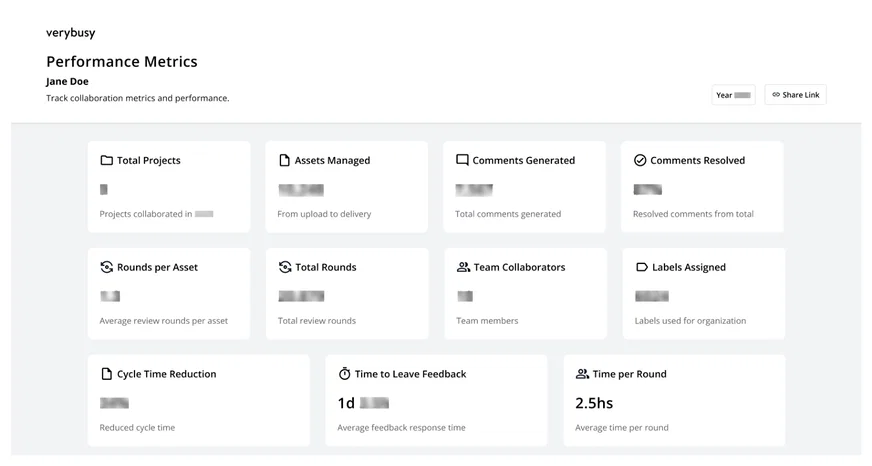
The panel aggregates all your 2025 project activity in one place; surfacing the real impact of your work across every retouching project you were part of.
Here's what you'll find inside:
- Total projects, assets managed, and review rounds
- Feedback generated and resolution rate
- Team collaboration stats
- Time metrics: cycle time, feedback response time, average time per round, and more
You can share the link and send it to your team, your manager, the client or any stakeholder who needs to see the numbers behind the work.
👉 Think there are other metrics worth tracking? Let us know here!
Note: Only available to users who collaborated on a project created in 2025. If you don't see the button in the nav bar, you may not have active projects from that period.
📊 Project Overview — Now with Assignment Metrics
Managing workload just got a lot clearer.
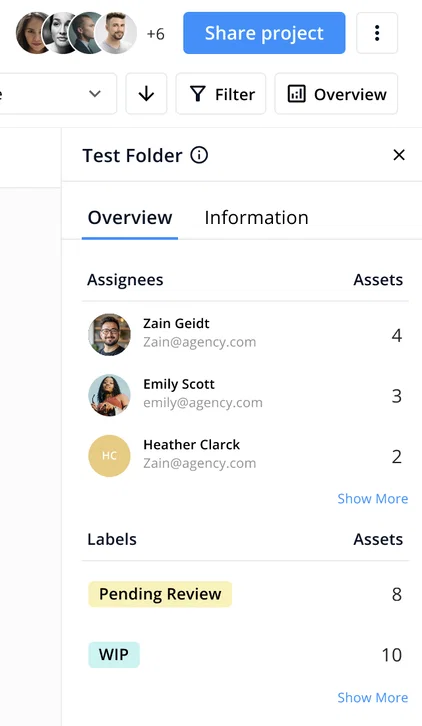
Get a bird's-eye view of workload distribution across your projects and folders. The Project and Folder Overview panel now shows a people-based breakdown of asset assignments alongside existing label tracking, so you can quickly see who owns what and where things stand.
- Get instant visibility of your team's assignments across projects and folders
- Go deeper when you need to by clicking on any assignee or label to instantly filter the asset view and focus on the details
- You can access from anywhere. Open the panel from project and folder thumbnails on the dashboard, or directly from inside
- Always stay in flow. The panel stays open as you navigate between projects and folders
🔒 Only available to users with an Owner or Manager-role in the project.
🛠 Improvements, bug fixes, and more!
- One unified view for all file types + Filter options
TIFFs, PDFs, EIPs, RAWs, and all other file types now live alongside your images in the main project view. No more switching tabs, no more missing files buried in a separate section.
Use the File Type filter to surface specific formats when you need to.
- Collapsible filter categories
The filter panel keeps growing with new criteria (rounds, document type, assignments, and more), so we made it easier to manage. Categories can now be collapsed and expanded, and your preferences are saved per project — so you only see what matters to you.
- Studio Plan Trial now available.
You can now explore all features included in the Studio Plan trial, no need to request access.
- Implemented 3 technical improvements for upload performance and speed for large files and big batch uploads.
- Fixed a bug where copying a reply above a comment would include unintended content when using auto-mentions.